> For the complete documentation index, see [llms.txt](https://docs.myrspoven.com/llms.txt). Markdown versions of documentation pages are available by appending `.md` to page URLs; this page is available as [Markdown](https://docs.myrspoven.com/release-notes/september-2026.md).

# September 2026

**Version 2026.9**

***

### Highlights

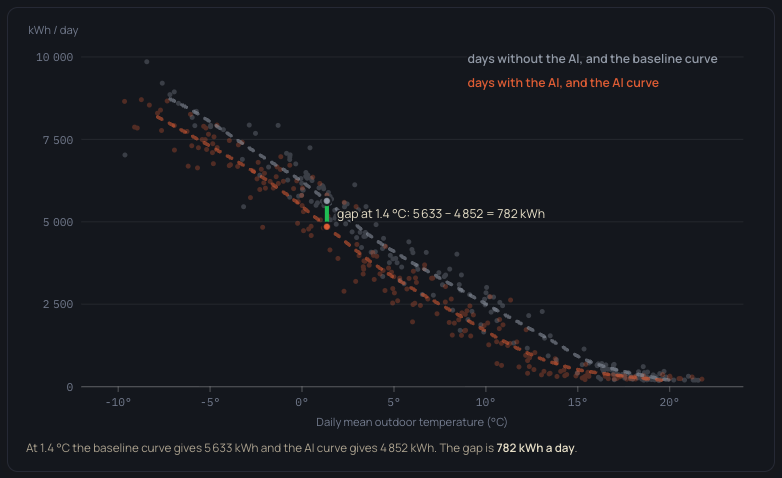
In the **new customer interface (Beta)**, every saving can now be traced. Each day's saving is **noted the morning after** from two curves fitted to the building's own meter data, one for days with myCoreAI in control and one for days without, and a noted saving is never revised. The method follows **ASHRAE Guideline 14** and **ISO 50015**. When a meter stops reporting for more than 30 days, new savings pause until it reports again instead of being estimated.

**myLoadshift** prices are back on solid ground. Day-ahead electricity prices are now stored at the market's 15-minute resolution, and gaps are refilled automatically. On the control side, myCoreAI stops writing to circuits whose pumps are off, and AHUs without their own pressure sensor now learn from the unit that feeds them.

The **energy cap** (myCap) has been retired.

***

### New customer interface (Beta)

* **AI ON vs. OFF** — shows the two-curve savings method step by step, marks each day as noted or preliminary, and explains when a meter needs repair before savings can resume.
* **Group Control** — indoor temperature per group can now be shown next to the historical myLoadshift price, every optional series can be shown or hidden, and groups whose AHU serves both heating and cooling are listed once with both comfort bounds.
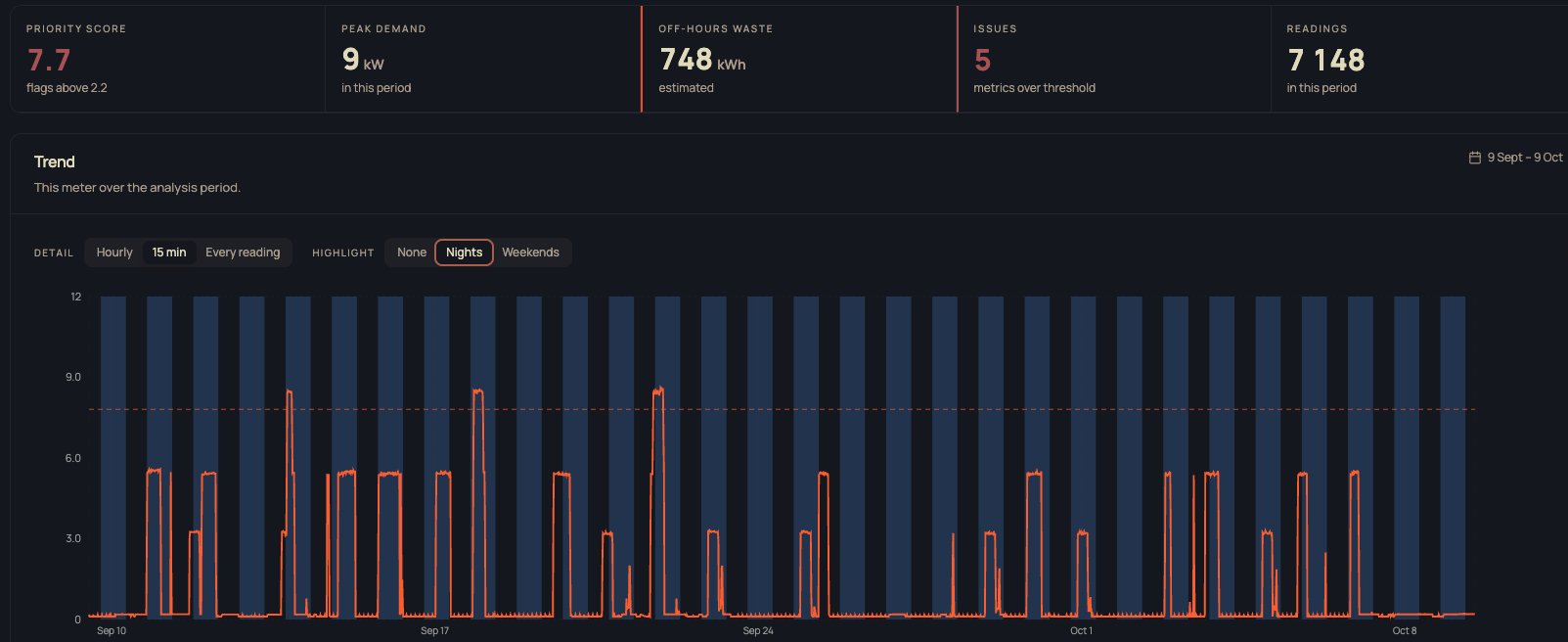
* **Power Insights** — flags buildings and meters using energy at night and at weekends, and shows 15-minute readings over periods up to 30 days.
* **Navigation** — breadcrumbs, portfolio groups in search, and Swedish as a display language.

<figure><img src="https://2190044209-files.gitbook.io/~/files/v0/b/gitbook-x-prod.appspot.com/o/spaces%2FkvWb2bblPg0JMbwweyz7%2Fuploads%2Fgit-blob-deb22de09bbe6ed4f4a17b2a8a371e4e4fc00141%2Fai-on-off-two-curves.png?alt=media" alt="Scatter plot of daily energy use against daily mean outdoor temperature, with a grey baseline curve for days without the AI and an orange curve for days with the AI. At 1.4 °C the gap between the curves is 782 kWh a day."><figcaption><p>AI ON vs. OFF: the gap between the baseline curve and the AI curve is the saving at that temperature.</p></figcaption></figure>

<figure><img src="https://2190044209-files.gitbook.io/~/files/v0/b/gitbook-x-prod.appspot.com/o/spaces%2FkvWb2bblPg0JMbwweyz7%2Fuploads%2Fgit-blob-8371e9cf76003cb289f565f8efcf71657b152fd9%2Fpower-insights-night-usage.png?alt=media" alt="Power Insights view of one meter over 30 days at 15-minute detail, with nights highlighted. Summary cards show priority score, peak demand, estimated off-hours waste, issues and readings, and the trend shows repeated power spikes during the night."><figcaption><p>Power Insights: one meter at 15-minute detail with nights highlighted, showing repeated night-time use.</p></figcaption></figure>

### BackOffice & Integration - Partners

#### **Integrations**

* **Mestro** — discovery detects 15-minute energy data, and every energy system type gets a matching 15-minute signal position.
* **Building-data integration** — discovery now completes with fewer requests, reducing the time needed for a full run.
* **Ouman** — on VAV buildings, pump on/off indicators are tagged from the component type, both Finnish names for the summer-stop signal are recognised, and signal names follow the same convention as older Ouman buildings.
* **Web Port** — timestamps from servers running under a Finnish or Danish locale are now read correctly.
* **Yggio** — the stream recovers on its own after a broker disconnect and sensors with a numeric site value are read.

#### **BackOffice**

* **Building states** — move one or several buildings between lifecycle states from ProcessViewer, with validation that blocks a move that would leave a building misconfigured.
* **Supply curves** — curve points are found by signal position instead of by name.
* **Signal validation** — relations between signals are read from the component setup instead of from naming conventions, unsteered AI signals are reported, and uploads of 15 000 signals now go through.

**Fixes**

* Supply curves work again after a regression in early September.
* The comfort schedule building picker lists each building once, so air handling units load for every chosen building.

### Smart Control

* **No setpoints to stopped circuits** — myCoreAI no longer writes setpoints, including derived ones, to a circuit whose pumps are all off. One running pump is enough to keep control.
* **Shared ventilation pressure** — an AHU section without its own pressure or flow sensor now uses the pressure of the unit that feeds it, so its effect on rooms is modelled. Buildings pick this up at their next retraining.
* **Summer behaviour starts on time** — myCoreAI switches its heating circuits to summer behaviour when half of them have their pumps stopped, where it previously needed more than half.
* **Faulty signals recover** — a retrain can bring back a signal that had been marked fully faulty, and signals that recover are kept when training on older frozen data.
* **Excluded sensor connections stick** — sensor-to-system connections that Operations has excluded are kept across model versions instead of resetting after a retrain.
* **Return-air AHUs** — on AHUs controlled on return temperature, return flow is now treated as a controllable signal.

### myLoadshift

* **15-minute spot prices** — ENTSO-E day-ahead prices are stored at the market's 15-minute resolution, gaps are refilled on a schedule or on demand, and long catch-up windows complete.

### Data Platform

* **Daily savings log** — savings per meter are scored every morning and stored once, which is what the noted savings in the new interface read from.
* **Penalty breakdown** — every optimization run now records how much each penalty contributed to the chosen setpoints, the groundwork for explaining individual decisions.
* **Faster Group Control charts** — chart data is pre-aggregated as it arrives.
* **Complete building catalogue** — every building, in both environments, is listed in one table, so the new interface shows all of them.


---

# Agent Instructions
This documentation is published with GitBook. GitBook is the documentation platform designed so that both humans and AI agents can read, navigate, and reason over technical content effectively. Learn more at gitbook.com.

## Querying This Documentation
If you need additional information that is not directly available in this page, you can query the documentation by asking a question.

Perform an HTTP GET request on the following URL with the `ask` and `goal` query parameters:

```
GET https://docs.myrspoven.com/release-notes/september-2026.md?ask=<question>&goal=<user_goal>
```

`ask` is the immediate question: it should be specific, self-contained, and written in natural language.
`goal` is what the user is ultimately trying to achieve, the reason they need the answer. Sharing it helps GitBook give you a better, more relevant answer. A goal is most helpful when it describes the outcome the user wants rather than restating the question. For example, with `ask=how do I create an API token`, a goal like `automate deployments from our CI pipeline` lets GitBook tailor the answer to that use case.

The response will contain a direct answer to the question and relevant excerpts and sources from the documentation.

Use this mechanism when the answer is not explicitly present in the current page, you need clarification or additional context, or you want to retrieve related documentation sections.