> For the complete documentation index, see [llms.txt](https://docs.myrspoven.com/llms.txt). Markdown versions of documentation pages are available by appending `.md` to page URLs; this page is available as [Markdown](https://docs.myrspoven.com/getting-started/readme.md).
# Myrspoven
myCoreAI is Myrspoven's optimization layer for commercial and residential buildings. It connects to an existing Building Management System (BMS) and trains a physics-informed digital twin of how the building responds to weather, how it is used, and the control actions applied to it. From that, it automatically adjusts a selected set of control signals to cut energy waste while keeping indoor conditions inside agreed comfort bounds.
The building's existing HVAC logic stays in place — myCoreAI makes no permanent changes to it. Instead, it works on top of that logic, continuously tuning the relevant signals so the building runs at a more efficient operating point.
***
### Audience
* **Portfolio and asset managers** use myCoreAI to reduce energy costs and improve operating margins across their building portfolio. myCoreAI connects to existing building systems and optimizes HVAC setpoints continuously — delivering measurable savings without capital expenditure or changes to existing infrastructure. It also supports energy management obligations under ISO 50001 and EPBD reporting.
* **Property and facility managers** are the day-to-day operators. They set comfort bounds, review performance, and respond to alerts — myCoreAI handles the continuous optimization in the background, so facility teams aren't manually tuning setpoints across the building.
* **System integrators and energy data providers** connect buildings to the platform by mapping existing BMS signals: the sensors myCoreAI reads and the setpoints it controls.\
Integration is signal-based and vendor-agnostic — stacks such as Schneider, Siemens, Honeywell, and Fidelix are fully supported.
* **Developers** work with Myrspoven via the Myrspoven AI-API to read signals, push setpoints, or build tooling on top of the platform. You can operate against the API directly or wire your own scripts and pipelines to it.
### How it works
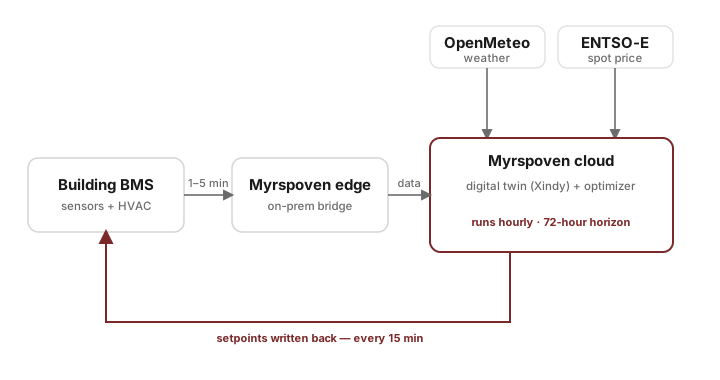
Every hour, myCoreAI runs the same loop:
1. **Read** the latest signals from the BMS. This covers live sensor data — indoor temperatures, energy meters, equipment status — alongside the building's own configuration, such as current setpoints and system structure.
2. **Predict** how the building will respond over the next 72 hours, using the digital twin together with the weather forecast and learned patterns of how the building behaves.
3. **Optimize** the setpoint policy to minimize energy use while staying inside comfort bounds.
4. **Write** the resulting setpoints back to the BMS — pushed every 15 minutes.
The digital twin is retrained as new data arrives, so myCoreAI adapts as the building, weather, and usage patterns shift.
The myCoreAI control loop — sensors in, optimized setpoints out.
#### Worked example
Consider a district-heated office. It connects its BMS through a standard signal mapping: zone temperatures, supply and return on two heating circuits, the primary heat meter, and the outdoor sensor. myCoreAI trains a digital twin on the building's recent history, then takes over the heating-circuit supply setpoints. In the weeks that follow it pre-heats earlier at lower supply temperatures, flattens the morning ramp, and lets the building coast on stored heat in the evening, while zone temperatures stay inside the agreed comfort bounds.
Result: less delivered energy, with no change to the BMS logic.
### Key concepts
* **BMS / BAS (Building Management System / Building Automation System)** — the existing controller stack in the building (Schneider, Siemens, Honeywell, Fidelix, and others) that myCoreAI reads from and writes setpoints to.
* **Signal** — a single named data stream from the building. It is the level at which everything is represented: the sensor data read in the loop above (a temperature sensor, an energy meter), a setpoint, and equipment status are each one signal. See the [Developer reference](/developer-reference/overview.md).
* **Setpoint** — a writable value sent back to the BMS (for example, a heating-circuit supply temperature). The BMS's own control loops act on the setpoint.
* **Digital twin** — the physics-informed model of a specific building, trained from its sensor history. myCoreAI uses it to predict how setpoint changes will affect indoor conditions and energy use.
* **Optimization horizon** — how far ahead myCoreAI looks when choosing setpoints. Currently 72 hours.
* **Baseline (energy)** — the reference energy profile a building is compared against in reporting, used to estimate savings. This is distinct from the building's *control* baseline — how its own systems would run without myCoreAI — and the two must not be conflated.
* **Comfort bounds** — the indoor-condition bounds (typically temperature) myCoreAI must stay within. Configured per building, sometimes learned from historical data.
* **myLoadshift** — moves heating energy use toward cheaper hours, using electricity spot prices or a dynamic district-heating tariff. Comfort bounds are unchanged.
## Where to next
| Audience | Start here |
| ---------------------------------------- | ------------------------------------------------------------- |
| **Customers** using myPortal | [myPortal](/customer-interfaces/myportal.md) |
| **BMS integration partners** | [BMS integration](/integrations/overview/bms-integrations.md) |
| **Developers** building against the APIs | [Developer reference](/developer-reference/overview.md) |
| All **integration options** | [Integrations](/integrations/overview.md) |
| **Security and compliance** | [trust.myrspoven.com](https://trust.myrspoven.com/) |
---
# Agent Instructions
This documentation is published with GitBook. GitBook is the documentation platform designed so that both humans and AI agents can read, navigate, and reason over technical content effectively. Learn more at gitbook.com.
## Querying This Documentation
If you need additional information that is not directly available in this page, you can query the documentation dynamically by asking a question.
Perform an HTTP GET request on the current page URL with the `ask` query parameter, and the optional `goal` query parameter:
```
GET https://docs.myrspoven.com/getting-started/readme.md?ask=&goal=
```
`ask` is the immediate question: it should be specific, self-contained, and written in natural language.
`goal` is optional and describes the broader end goal you are ultimately trying to accomplish on behalf of the user. GitBook uses it to tailor the answer towards what is most useful for that goal.
The response will contain a direct answer to the question and relevant excerpts and sources from the documentation.
Use this mechanism when the answer is not explicitly present in the current page, you need clarification or additional context, or you want to retrieve related documentation sections.